

Medicine label scanner
Scan a medicine label. Review the details. Then save.
Point your iPhone at a printed label and PillLabel drafts the medicine name, strength and directions for you to check.


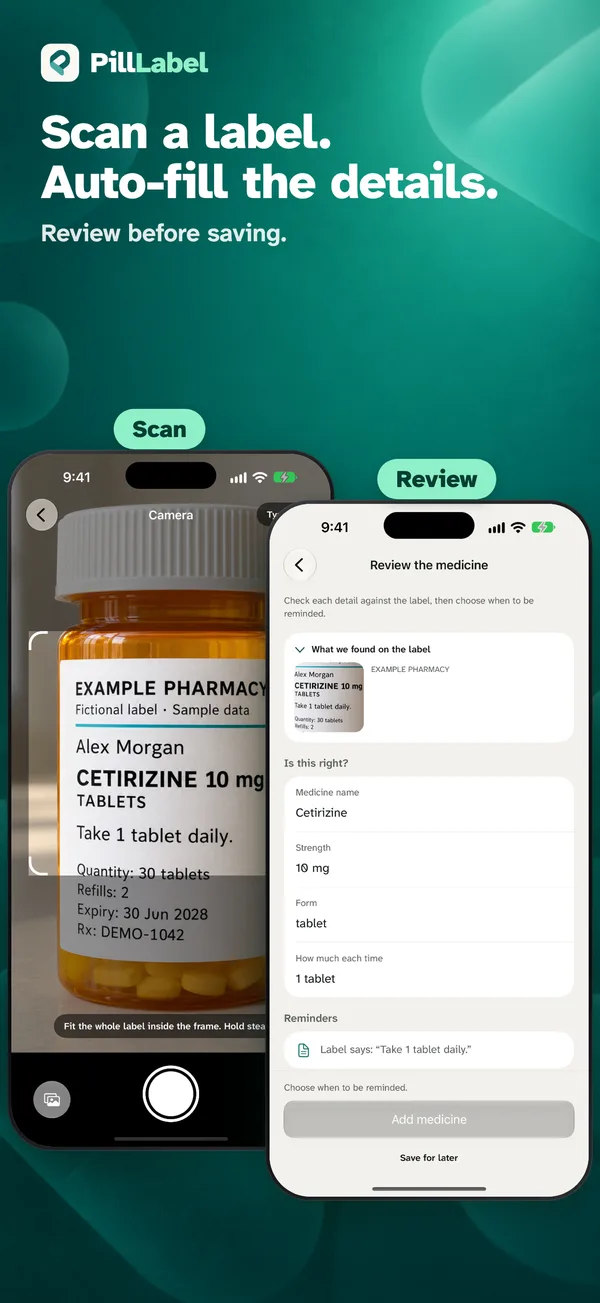
From label to a reviewed draft
- Scan. Fit the whole label inside the frame, or choose a photo from your gallery.
- Review. Compare each field with the label and edit anything that is missing or wrong.
- Save. Choose when to be reminded. Scanning never activates a routine for you.
What you need
- An iPhone running iOS 26 or later.
- Enough free storage and an initial model download. After that, scanning runs on your device.
If scanning is not available on your device, Enter manually always works and needs no model download.
Limits to know
Scan results can contain mistakes. PillLabel reads printed text only. Handwriting is not supported. Always check the name, strength and directions against the original label.
PillLabel helps with entry, reminders and logging. It does not diagnose, prescribe, check interactions or recommend doses, and it does not replace a clinician or pharmacist. Check the original label and professional instructions.
Try it free
Three medicines with reminders are free, scanned or typed, plus one prescription. Premium, bought in the app through the App Store, unlocks unlimited medicines and prescriptions, and family profiles.
Common questions
Is my label image uploaded?
Scanning runs on your device after an initial model download, and scan images are stored locally.
Can it read handwriting?
No. Handwriting is not supported. Use printed labels, or enter the details yourself.
How many labels can I scan for free?
Scan labels free for up to three medicines. Premium unlocks unlimited medicines and scans.
What if the scan gets something wrong?
You review every field before saving and can edit it. Nothing is saved or scheduled until you confirm.